As this year has become a bit of a “freestyle” year for me, writing-wise, for the month of April, in a very loose adherence to the Camp Nanowrimo challenge, I have been working on a new novel idea, a fantasy novel titled Legacy of Iron. It’s a political thriller set in a magical world undergoing an industrial revolution, and I’ve been having a lot of fun writing it as this is something very new to me.
Writing fantasy is new to me and I’ve been quite excited dipping my toe into this new territory.
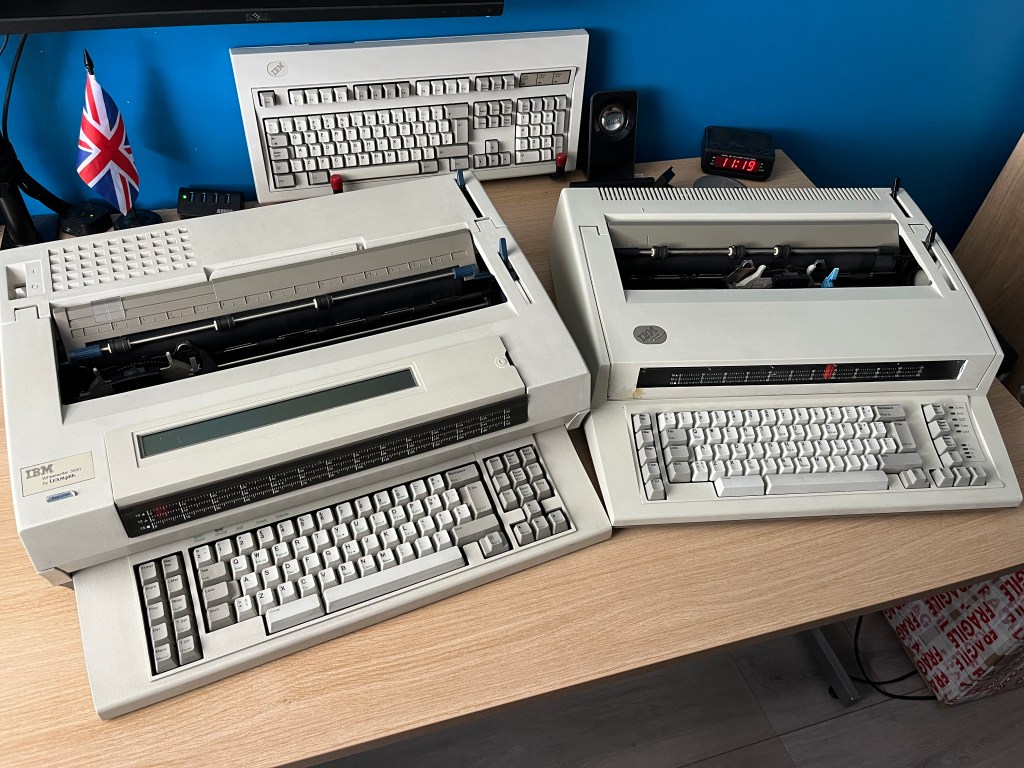
As part of the “challenge”, I have been drafting this book in a distinctly analogue way using a typewriter; namely this IBM Wheelwriter 3500 electronic typewriter that I recently acquired:

There’s always been this romantic notion of an author hammering out their latest book on a typewriter, but in today’s modern world this is an increasingly obvious anachronism with how we all work digitally. In approaching this challenge I’ve considered how to bridge the gap between the romantic notion of an author laying down insightful prose on their typewriter and how we manage those words on a practical level in a digital landscape (for editing, publication, or storage).
First, let’s examine the limitations brought about by using the typewriter (these will focus also specifically on features unique both to the Wheelwriter and the model 3500 I have been using, but the general gist will apply.
While the Wheelwriter is not, perhaps, the obvious choice for a typewriter, I did have some reasons for choosing this specific machine:
- Familiar typing feel: In my previous post I did discuss why I prefer tactile, mechanical keyboards; namely, IBM’s iconic and exemplary Model M buckling-spring design; the Wheelwriter is contemporary to the Model M keyboard and indeed features a buckling-spring keyboard.
- A machine for typing: The Wheelwriter is designed to do one job very well – typing characters onto paper. That is all it does, and it does this job very well, producing high-quality, consistent typed text. Some of the advanced features that this particular electronic typewriter has – namely delayed print mode (I can type a line on the LCD display and it only prints at the end of the line, allowing corrections before committing to print) and character erase (a special additional ribbon allowed typos to be “lifted off” the page, a feature that works about 90% effectively, indeed, the Wheelwriter can go back basically over the entire page to correct). The print quality is superb; being computer-controlled, the alignment is nigh-on perfect, and using film ribbons results in near-laser printer quality.
All that said, what challenges have I encountered?
- No up-to-date word counts of my progress: I have found that I write in blocks of “pages”, not wanting to leave a page half-done. But I didn’t know how much I’d written until I scanned the pages in and used an OCR (optical character recognition) tool to convert the pages into machine-readable text, which has been an amusing inversion of the usual issue of data being “machine-readable” only. This has proved to be an additional step.
- Virtually no formatting: While the Wheelwriter allows for basic formatting – bold and underline, not all typewriters do. There is no facility for italics on this machine (unless I got a printwheel with an italic font, which I don’t); I could use underline as a substitute but underlining would use more ribbon and causes the machine to print appreciably slower.
- No auto-saves: While I have been scanning my pages ad-hoc (to get rough wordcounts), the work is stored on paper first and must be digitised later. I am also investigating ways to get this manuscript into a computer in a format that I am able to work with, that preserves as much of my formatting (tab stops and indents, most prominently) as possible. I’ve yet to find a perfect solution so I expect that, when the time comes, a “clean-up” phase between ingesting the scanned pages and being able to work on them in a word processor program will be needed.
- Consumables: Using a typewriter means that a lot of the aspects of writing that are taken for granted when writing digitally become both finite and incur a cost. For instance, a ribbon for a Wheelwriter, I have found, is good for around 55-60 pages of typed text, where the page is all text. These cost around £5-£8 each to replace. The correction ribbon also has a finite use; indeed, the original ribbon the machine shipped with was so dried out it didn’t function. Paper, too, isn’t free; I have chosen not to use both sides of the page which could be a mitigating factor next time.
- Built-in keylogger: The film ribbons the Wheelwriter uses are single-use and, by nature of how a daisy-wheel printer works, leave a record of the impressed character in the reel. Tin-foil-hat types would probably find this alarming as a history of everything the machine has typed is there in the ribbon; I’m more thoughtful, going to the above point, about how much of the surface area of the ribbon goes unused which is a consideration. There is no means to use the other half of the ribbon or turn it over, which seems like an oversight (then again, IBM was also selling ribbons as well as the machines, so it figures).
- Mechanical problems: I’ve found that using a 30+ year old machine has indeed incurred some mechanical problems; the 3500 is the second Wheelwriter I’ve had, as my first (a Personal Wheelwriter 6781 which is probably a slightly better looking machine) encountered some irrecoverable issues about a week into the challenge. Even the 3500 had an issue which stopped it printing (a core function) due to the deterioration of a rubber part which, after 30 years, and me typing over 100,000 characters (i.e. letters) in about two weeks, finally completely deteriorated. I managed to repair this part with a piece of cardboard(!) but I’ve found that owning and operating this machine is very akin to owning and operating a classic car: it’s made more of a mechanic out of me than I expected (and I’m not unhappy about that, truthfully, as it means I’m learning)
Overall, I have enjoyed this challenge a lot, and I intend to finish the first draft of Legacy of Iron on this machine. While I wouldn’t write all my books in this way, it’s been an enjoyable step back and I look forward to continuing to master the challenges!


 Richard Holliday - Author
Leave a reply to Why Hitting “Reset” Was Key for Legacy of Iron – Richard Holliday Cancel reply