Last time I spoke about my writing goals for the last quarter of 2025 – how I’m going to be spending the ber months outlining at least one of my planned Disaster Series short novels.
I’m a pretty ardent convert to plotting and outlining; though with my very early projects I shot from the hip and wrote by the seat of my pants, and it shows in those works, many of which will likely never see the light of day. My outlining strategy has evolved over time and now I’m very comfortable using StoryGrid’s Five Commandments of Story when structuring my work. My first foray into this was when I wrote my novella Nightmare Tenant and I was amazed at how much faster having a solid, structured outline allowed me to write that book.
My outlining process usually takes this form:

The scene/chapter outline I work from while drafting takes the form of a Microsoft Excel spreadsheet. I generally try to have templates but these working documents evolve as my needs and process evolves too. It likely doesn’t help that I am a notorious tinkerer, too.
When I wrote Legacy of Iron again to completion, one of the key things I did was to assemble my scenes and built a pretty advanced – but bespoke – outline/tracking spreadsheet:
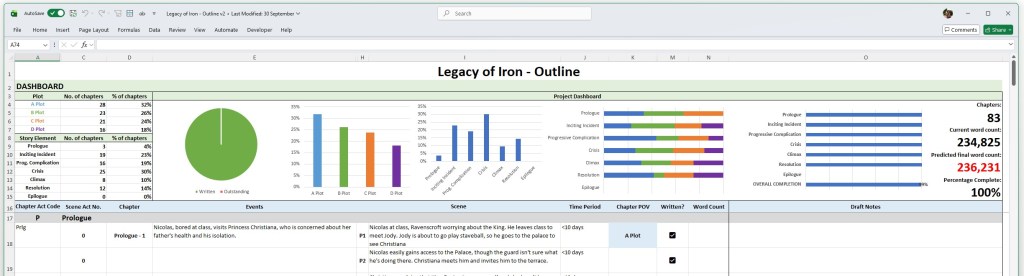
As is the case with these things, most of the features I ended up adding were bolted on ad-hoc as the project progressed. To drive the dashboard at the top of the spreadsheet – something I found invaluable to visualise both my progress in the draft and in laying out my story structure – a variety of baroque codes and numbers were derived and these all had to be hand-input.

A lot of the under-the-hood calculations take place on another sheet in this workbook, but some of these values must exist alongside my actual outline and it was… cluttered and unoptimised. Indeed, one of my favourite additions was the Predicted Final Word Count and Percentage complete areas, and these were added quite late while writing Legacy but were surprisingly motivational. However this came at a time where inputting the word-counts of many dozens of scenes seemed like work that wouldn’t actually help.
As I prepare to move onto the scene/chapter outline phase for the first Disaster Series novel, an expansion of my Boat Party short story – I have both simplified and made more powerful these functions so that a lot of the under-the-hood stuff happens truly behind the scenes:

- I have tidied and hidden the “helper” columns in my main outline document and automated them, so they fill with the codes to drive the dashboard by themselves.
- All of the dashboard charts are now free-floating which means I can, if needs be, add additional columns without the anxiety of wrecking my layout and having to divert time to amending that when I should focus on the drafting.
- My predicted final word count calculation (which was late addition in the Legacy of Iron process) is now driven by word count and not scene completion.
With these enhancements, a lot of which are “under the hood” to drive the dashboard, I’m already feeling a lot more comfortable about using this enhanced version of the outline document, and I feel this will be worth the 3 hours I spent on it. It’ll allow me to more efficiently lay out my future books, and it’s versatile to expand to a project of any size.
NB: I often get asked if I can share my spreadsheets for others to use, and I’m really flattered by the interest. They’re custom made and tailored to my own writing process and not designed for general use. I’m also not able to provide any technical support or troubleshooting if something doesn’t work in an unexpected way, so I choose not to share them under any circumstances for that reason. I hope you understand!
 Richard Holliday - Author
Leave a Comment